

Time to Read:
|
Which AI powered game improvement app is right for you?
In early 2024, I reviewed the Golf Fix App. At the time, I remember being impressed with what AI could offer to people looking to improve their game. Now, within this same year, two other AI golf apps have burst onto the scene: the Sparrow Golf app and SportsBox AI. I came away from this experience equally impressed with how fast AI continues to revolutionize the golf industry. This review will be focused on the two leading, paid subscription golf training apps. The focus of this review is breaking down what each app offers and the differences between traditional video-based feedback with Sparrow Golf and biometrics-based feedback with Sportsbox AI.
Please note, Sportsbox AI Golf recently announced a partnership with Foresight Sports, and the ability to link the Sportsbox AI Golf app to a launch monitor. I plan reviewing this feature in the future, but this review will focus on the apps themselves. Sparrow Golf is currently $14.99 monthly, or you can buy it for $99.99 annually. Sportsbox AI Golf is currently $15.99 monthly, or you can pay $109.99 annually. Both of these apps also offer subscriptions for coaches, but these options are not part of this review.
Both the Sparrow Golf App and the Sportsbox AI Golf App offer valuable tools for golfers seeking to improve their game. The Sparrow Golf App provides detailed video analysis and a library of drills, making it a solid choice for those who prefer traditional video-based coaching. The Sparrow Golf App is geared towards any level of golfer and has a user-friendly interface that is easy to understand. On the other hand, the Sportsbox AI Golf App stands out with its advanced 3D swing analysis and personalized AI-powered feedback, providing a more immersive and engaging experience that focuses on a golfer’s biometrics to provide numerical feedback. However, with the higher level of detail comes a steeper learning curve. As another user of Sportsbox AI Golf told me, it is similar to playing video games on a classic Gameboy your entire life, and then one day being forced to use a brand new modern gaming PC to play the same game. There is no question that SportsBox AI is the superior app when it comes to providing tools aimed at improving your game, but that might may not be the best thing for every golfer. Some golfers may require the assistance of a golf professional to fully understand and utilize the data provided through Sportsbox AI, which, as noted above, uses biometrics to generate numerical data for feedback instead of traditional video-based coaching. The numerical ranges pre-programmed into Sportsbox AI Golf are based on tour averages and may not be what is best for you. I highly recommend working with a coach to tune the ranges offered in Sportsbox AI Golf to give you the best feedback for your swing, but the preset ranges are a good start and give you something to work towards.
Interfaces
Upon opening either of these apps, you will find a lot of similarities. Both have well laid out home screens with standard options. You will find areas for recording your swing for analysis, drills to improve, and setting swing goals for you to focus on as you practice. Sportsbox AI offers even more options, which is a theme you will notice throughout this review. Sportsbox AI Golf gives you the ability to upload previously recorded swings from your phone for analysis, but, at the time of this review, this feature is not available on Sparrow Golf. While the Sportsbox AI Golf uploading requirements are restrictive and far from perfect ( several uploads created some genuinely hilarious 3D models), the fact that this option is unavailable in Sparrow Golf is disappointing. I’m confident that as SportsBox AI continues to improve, so too will the consistency of the analyses.
A noticeable difference between these two apps is the various modes that Sportsbox AI Golf offers. With Sportsbox AI Golf, you have the ability to monitor a practice session and find your most efficient swing. I personally found this ability to be one of the best features in these apps. Previously, you would set your phone to record, get in frame, hit the ball, walk back to your phone to see the analysis, and then begin the process again. Needless to say, that process is time consuming and tedious, but it also can lead to some swing anxiety and feeling like you have one chance to capture a good swing before starting over. Sportsbox AI Golf tackles this issue brilliantly by being able to set up your phone and hit as many balls as you wish while being recorded for review at a later time. You can also choose three areas to target that will display on the screen in large font to get instant feedback between the swings.
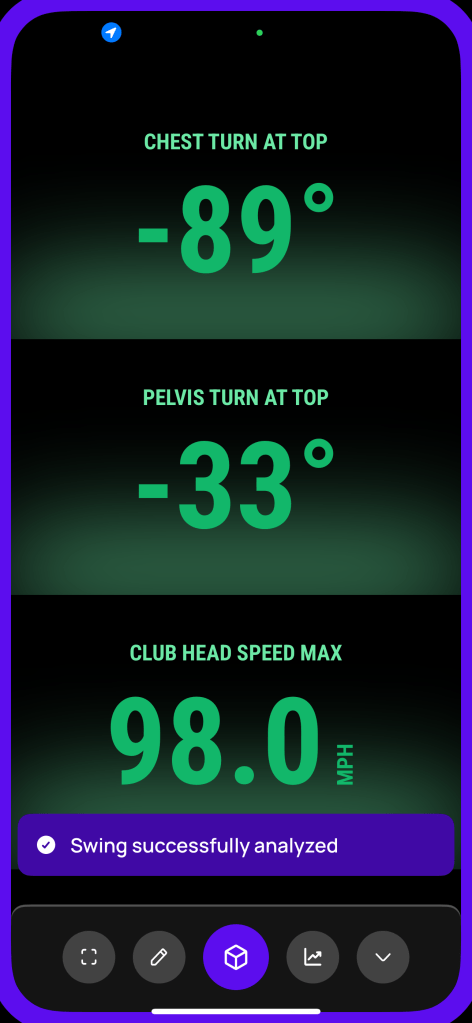
When you are done, you can review the session and take a deeper dive into each swing to get a full analysis.
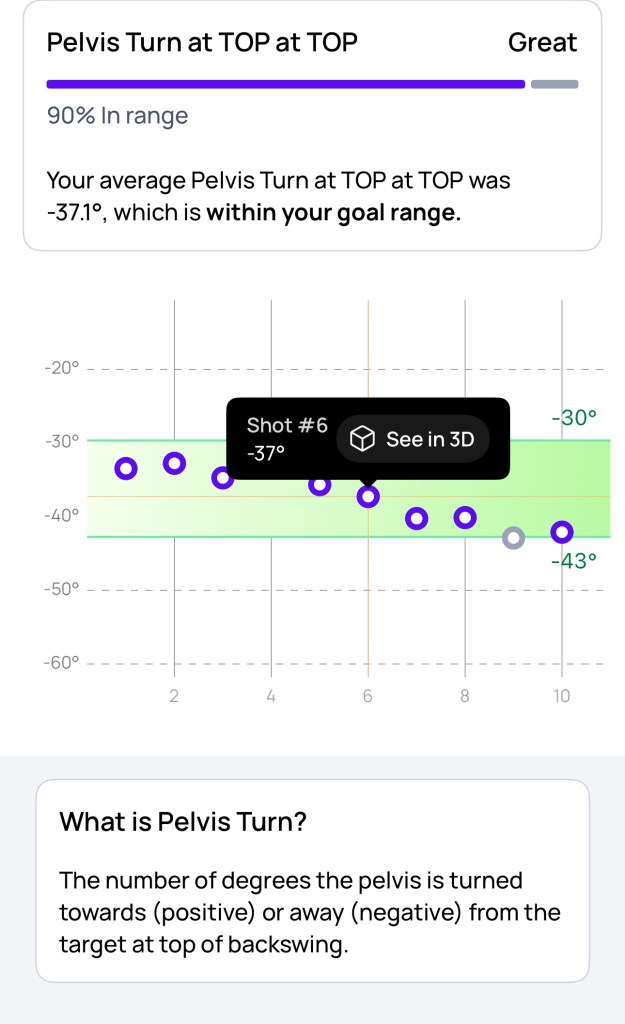
Not only does this feature save time, but it can help you repeat something you are working on without having to pause. I also found this to be a great tool to show your consistency, or lack thereof (in my case) on a swing-to-swing basis. To be fair, Sparrow Golf analyzes five swings at a time, but for reasons that will be discussed below, this does not compare to the practice session mode offered by Sportsbox AI Golf. Additionally, there is no analysis that is given to you between shots with Sparrow Golf.
Sportsbox AI Golf also offers the ability to help you find your most efficient swing, which is essentially speed training. This mode will let you record three driver swings at a time and give you feedback on your current club head speed and what it believes is your maximum club head speed potential. This is one of the newest features added to SportsBox AI Golf, and, unfortunately for me, I could not get an accurate reading on my speed. My swing speed with driver varies between 111 and 115. Other users may have better luck. I will certainly revisit this feature when I review Sportsbox AI with the Foresight Launch Monitor pairing.
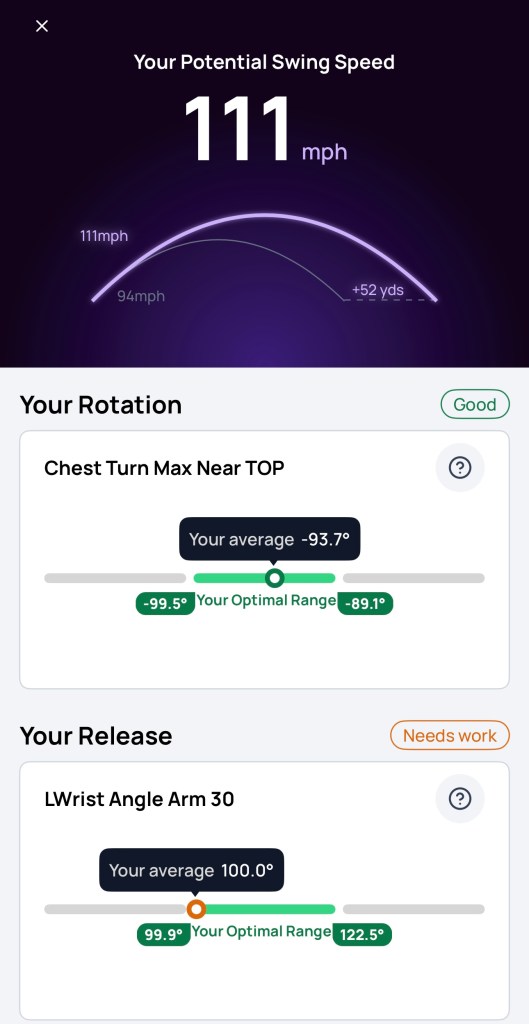
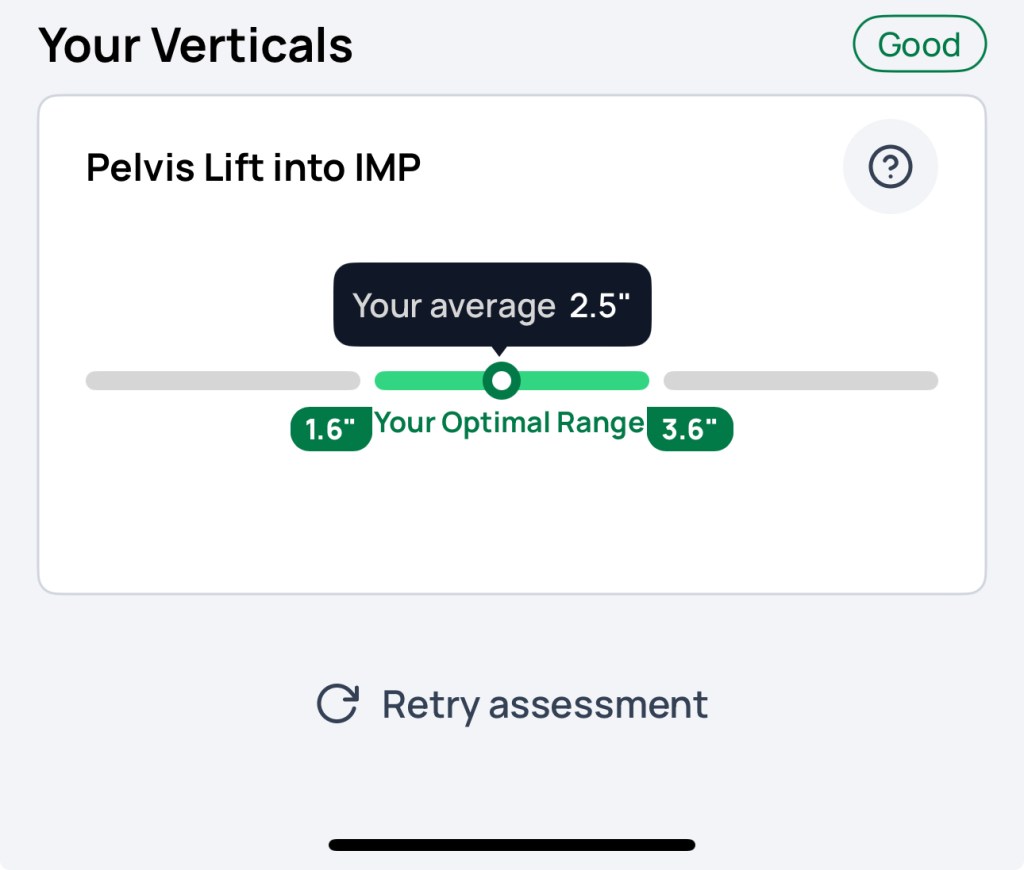
Sportsbox AI Golf will also give you tips, based on your swing biometrics, on things to work on. Once you finish a session, you can simply start over with three more driver swings. Speed is king in golf right now, and this is a great tool to help golfers of any age or skill level find ways to increase their speed and achieve longer drives.
Recording
To use either app, you will need a tripod that holds your phone around 4 feet off the ground. You can get analysis from both apps on your swing from face-on and down the line. Since Sportsbox AI Golf uses biometric data for feedback instead of the traditional video analysis, there is much more emphasis on face-on recordings with Sportsbox AI Golf. That is not to say that you cannot gather data on your swing from down-the-line video with Sportsbox AI Golf, but to get all the available readings, you will need to record face-on. Both apps let you use the camera on the front or back of your phone. For reasons that are unknown and extremely frustrating, Sparrow Golf does not have the ability to allow you to use the zoom feature on your camera. For an app that requires about ten feet of space for you to record yourself, being able to zoom out should be something they utilize. I have an indoor golf simulator, and this issue led me to hitting shots off my carpet to use the app inside. It takes a decent amount of space to set up an indoor simulator, my room is almost 25 feet deep, and I did not have enough space to use this indoors without wanting to throw my tripod into the wall. If you plan on using this app outside, then this required amount of space probably won’t matter to you, but for those of you who plan on recording indoors, this could be an issue.
Sportsbox AI Golf allows you to use the zoom feature and only requires about eight feet of space, so this was not an issue on their platform. I also found the Sparrow Golf app to be extremely finicky when it came to getting the player into the capture zone, and this issue persisted even when I took it outdoors. If you aren’t exactly in frame, it has some issues wanting to capture properly, and considering Sparrow Golf allows you to analyze five shots at a time and then gives an overall score based on each swing, this compounded the issue. To make matters worse, any sort of motion pre-swing, such as waggle, would lead to the app capturing the movement as a full swing. This happened time and time again whether I was indoors or not and would result in erroneous results. For example, my average of five swings might be 7.2 out of 10, but when I looked at each swing, a couple would have a score of less than 3 because it caught the waggle and nothing else. On the other end, Sportsbox AI Golf had no problems with any pre-shot movements and only captured my full swings throughout my testing. Even better, it has an AI voice that will give you exact directions on where to move to be perfectly in frame and will display a massive green light when it is ready for you to swing. I will admit my own bias here due to my desire to use these apps to record indoors, but it was night and day difference for me considering ease of use when it came to capturing video, with SportsBox AI being the clear winner.
Video Feedback vs. Numerical Data
This is where the similarities between these two apps essentially ends. While there is some overlap, the way these two apps present feedback to the golfer are completely different. There is not a right or wrong answer here, but it depends on what works best for you.
SPARROW GOLF
Sparrow Golf uses traditional video-based feedback to help you improve your game. I believe Sparrow Golf presents this feedback well and is the best looking interface I have seen with video-based feedback. After recording your swing, Sparrow Golf will play the swing back to you and highlight things you are doing well and things you need to work on.
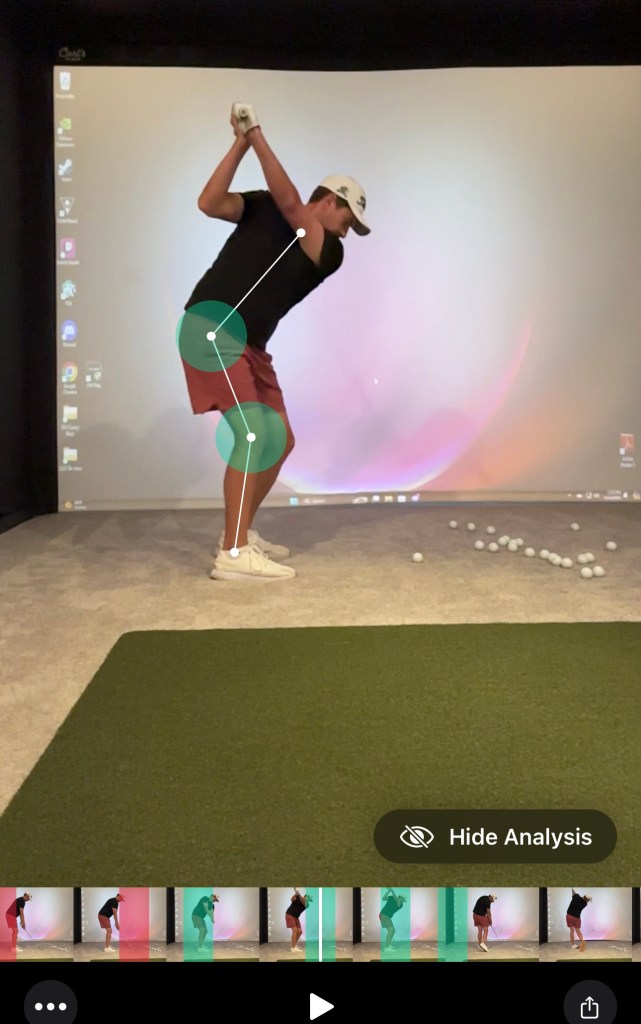
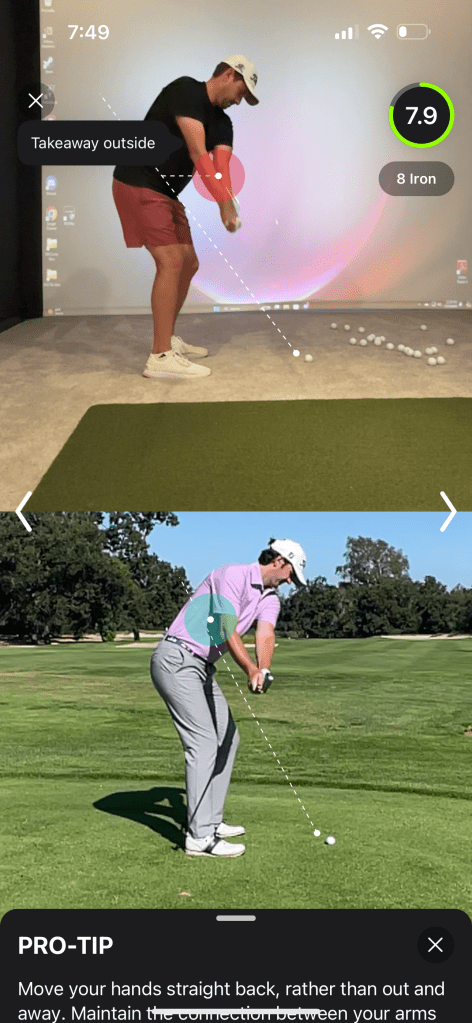
If there is something you need to fix, Sparrow Golf will suggest drills and offer to show you a professional doing whatever the app believes you could do better. I think this looks great and is extremely easy to use. It is also great that they are able to show you side-by-side with a professional, as it provides great real world examples of how you can improve your swing. Sparrow Golf correctly pointed out my outside takeaway, and my stance being on the narrow side.
However, my main issue with Sparrow Golf is that it sometimes provides incorrect feedback. For example, the app told me I was not rotating my shoulders enough, loading my trail leg in the backswing, and that I had too much shaft lean at address.

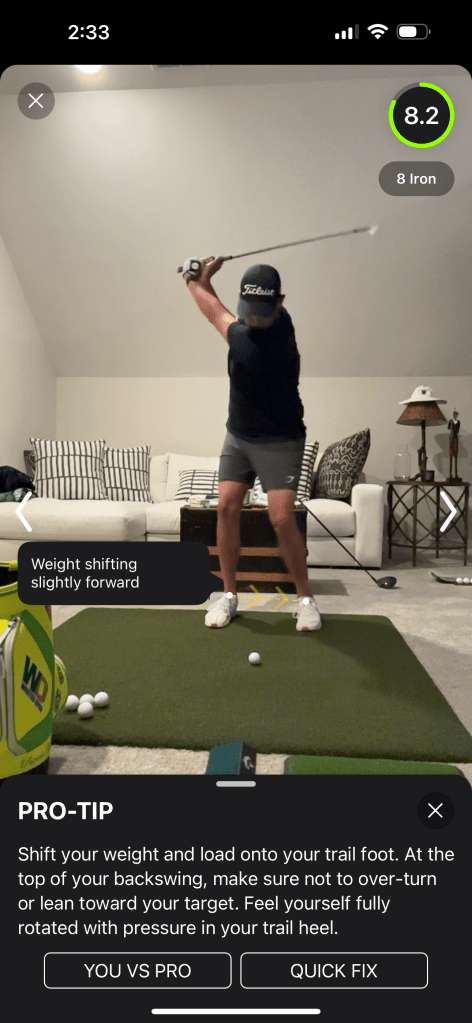

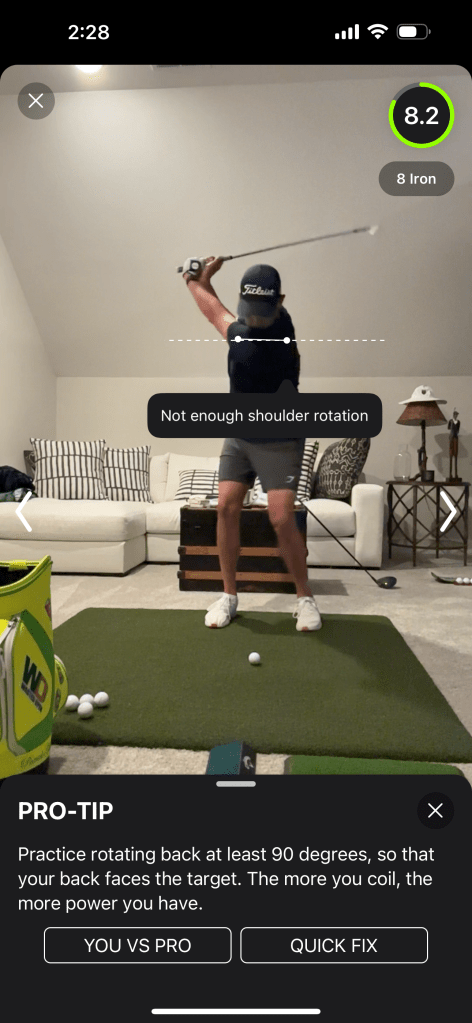
I thought the shoulder rotation not being read correctly could have been from me wearing dark clothing, but when I changed shirts, it did not seem to help. I understand these things happen, and it can’t always read things incorrectly, but for less experienced players, these incorrect readings could cause them to chase issues that do not actually exist. Sparrow Golf has an easy-to-follow and great looking feedback system, but for an app with a paid subscription, I expected the accuracy of the feedback to be more consistent.
SPORTSBOX AI
A complete diversion from your traditional video-based feedback, Sportsbox AI Golf uses video captures to provide numerical data on how your body moves during your swing. Based on this data, Sportsbox AI Golf creates a 3D model and gives you information on how your body moves through the swing compared to ranges measured from golf professionals. From here, Sportsbox AI Golf will provide drills and suggestions on how you can improve your movements. I will admit, I was completely lost when I started using this app, and it took several hours before I had a general understanding of what I was looking at when it came to the feedback. I am not going to give a full breakdown of the meaning of all the data points in this review, but Sportsbox AI Golf does a decent job explaining it, and there are online materials you can access if you want to learn more.
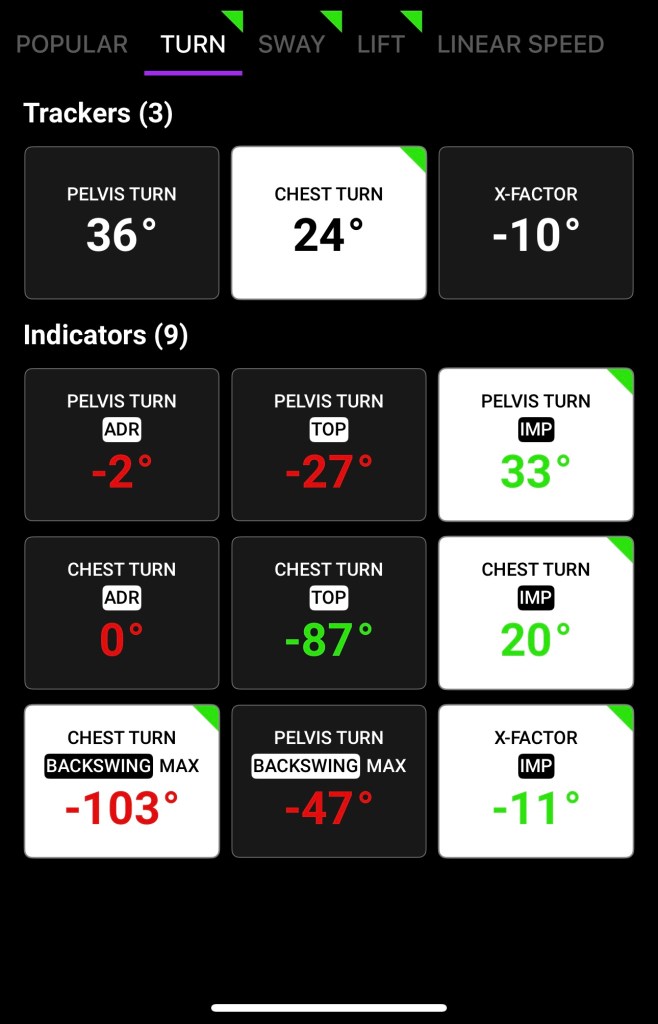
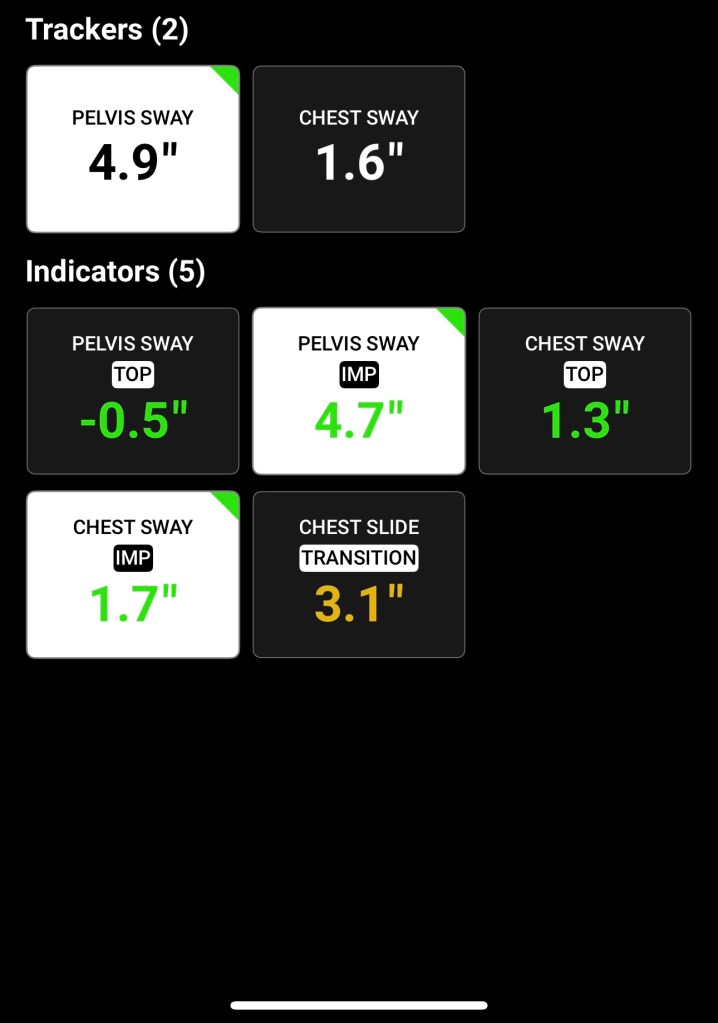
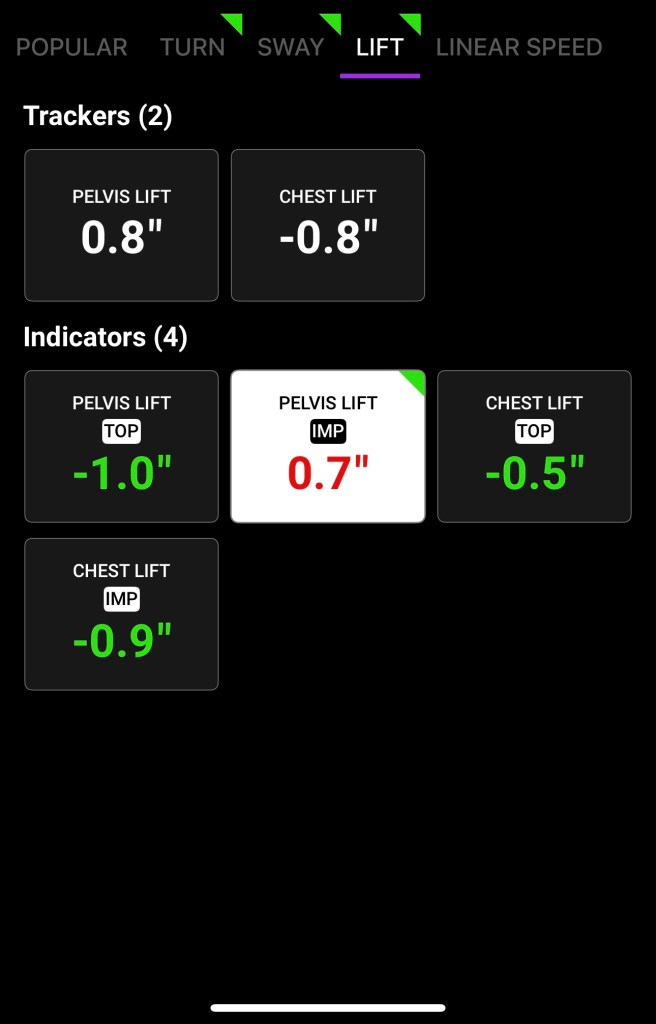
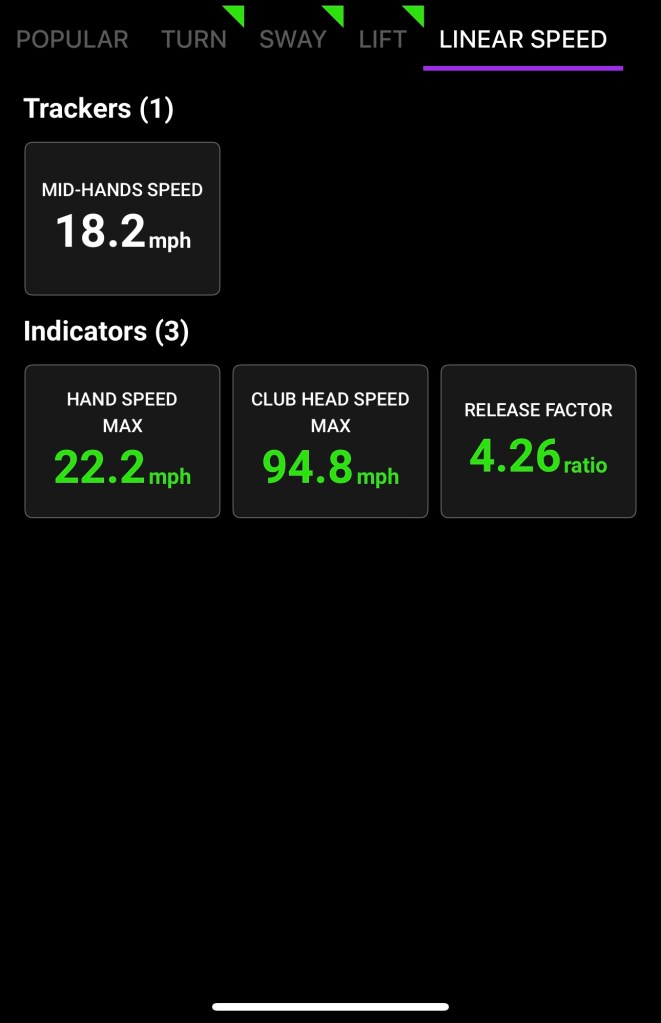
These are the different metrics that Sportsbox AI Golf will measure and track.
However, once you get past the learning curve, it really feels like Sportsbox AI Golf is superior to anything that has been available on a mobile platform to this point. The ability to create a 3D model of yourself allows you to see things that you could not see before, and my favorite example of this is the overhead view.

Sportsbox AI also allows you to compare your 3D model next to, or overlapped, with a professional model. This allows you to analyze your swing in ways that were not previously possible.
While Sportsbox AI Golf is not going to tell you the same information as Sparrow Golf, such as my outside takeaway shown above, but you have the ability to draw lines on your actual video or 3D model to get that information yourself. The focus on biometrics to provide numerical feedback is certainly geared towards more serious players, but it is certainly worth the learning curve for players of all skill levels. Even for serious and experienced players, Sportsbox AI Golf is a great tool to use with your swing coach to dial in the numbers and have a better understanding of what works best for you. After using this app, I personally think every coach in the country that gives range lessons using their own visual feedback should consider adding Sportsbox AI Golf to their toolbox. It is a simple way to provide a detailed analysis that the naked eye, no matter how skilled, cannot see.
Summary
The Sparrow Golf app and the Sportsbox AI Golf app both aim to enhance golfers’ performance through advanced technology, but they differ in their approach and features. Sparrow Golf primarily focuses on swing improvement by offering personalized feedback and data analysis tailored to individual golfers. It employs AI to provide insights into swing mechanics and suggests specific adjustments to enhance the golfer’s technique.
In contrast, the Sportsbox AI Golf app leverages 3D motion capture technology to provide a comprehensive biometric analysis of a golfer’s swing. This app delivers detailed, real-time feedback on various aspects of the swing, such as body movement and alignment, enabling a more in-depth understanding and refinement of technique.
While both apps utilize AI to improve golf performance, Sparrow Golf emphasizes personalized AI-driven recommendations, whereas Sportsbox AI Golf offers a broader, biometric approach through 3D analysis. Based on my experience using these apps, I cannot recommend Sportsbox AI enough to those wanting to have a deeper insight into their game and believe it is worth the subscription cost. While Sparrow Golf has made improvements on the video-based swing improvement model and is a great tool for beginners learning the basics, I believe the issues it has is not worth the monthly subscription cost when the Golf Fix app provides many of the same features for free.

Author: Jordan Williams
Jordan is the lead product reviewer at First1000Courses.com. Jordan has been playing golf for over twenty years, is a three handicap, and actively competes in amateur events.





 First 1000 Courses
Leave a comment